
AI Headshot Generator
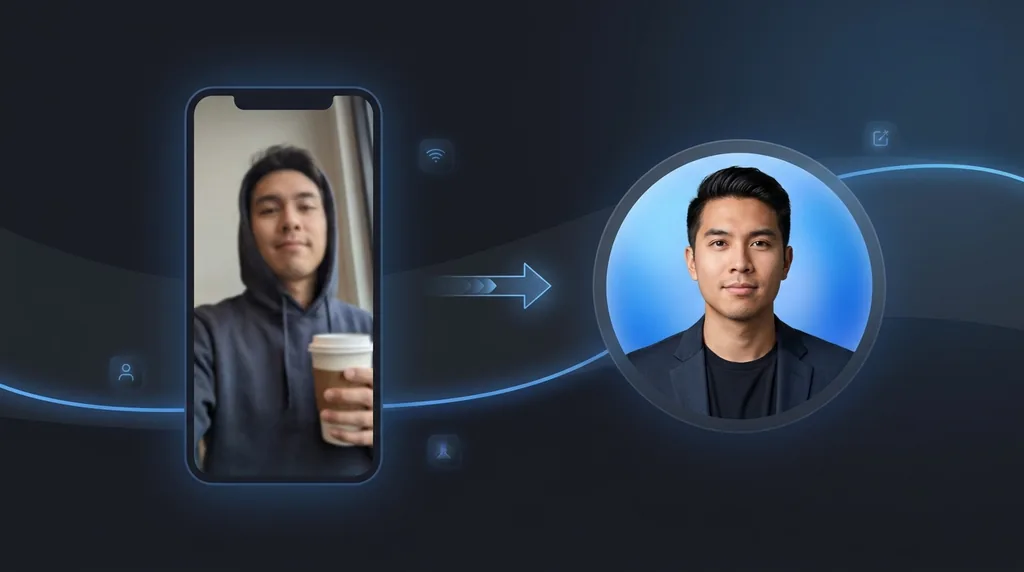
Turn an everyday selfie into a polished, professional headshot - Studio lighting, clean background, business-ready.
Click or drag a photo here
JPG, PNG or WebP - up to 15 MB
Uses 10 credits - earn more free
Working on your image…
Why use AI Headshot Generator?
Studio-quality look
Flattering lighting, clean background and sharp focus without a photographer.
Multiple styles
Pick a corporate, studio or outdoor look to match where you'll use it.
Ready in seconds
Upload one photo and get a polished headshot instantly - No booking required.
A great headshot opens doors - On LinkedIn, a CV, a company page or a portfolio. But a real studio session is expensive and slow. The AI Headshot Generator turns a single clear selfie into a professional-looking headshot with clean lighting, a tidy background and business-ready styling, while keeping you recognisably you.
How it works
Upload a selfie
A clear, front-facing photo of your face in decent light works best.
Pick a style
Choose corporate, studio or outdoor, then generate.
Download
Save your professional headshot and use it anywhere.
Popular ways to use AI Headshot Generator
People use the AI Headshot Generator for LinkedIn and CV photos, company team pages, conference speaker bios, real-estate and sales profiles, and dating apps. It is a fast, cheap alternative to a studio session when you need a polished, consistent look across a team.
Pairs well with our Portrait Enhancer and image enhancement guide.
New to this? Read our image enhancement guide.
See what others are creating →Build a consistent set for your whole team
Choosing the right style for where it'll appear
Best photos to use
- A chest-up or head-and-shoulders selfie, not a tight face crop, so the AI has shoulder room to render a blazer collar and lapels instead of pasting attire onto a floating head
- Eyes level with the lens at roughly your own height, not a phone held high or low, because a downward or upward angle bakes in a 'selfie' tilt that no studio preset will fully correct
- Flat, even front light (a window or overcast day) with no hard side shadow across one cheek, since the AI applies its own key light but cannot rebuild facial detail that the original shadow has already swallowed
- Hair pulled back so your forehead, jaw and ears are visible, letting the restyled collar sit cleanly instead of fighting stray strands at the neckline
- A current-glasses-on shot if you actually wear glasses daily, because the model treats frames in the source as the spec to keep, and a bare-eyed selfie will produce a glasses-free headshot that no longer matches you in person
What to keep in mind
- It paints fresh business attire over whatever you were wearing, so a chunky scarf, hoodie strings, a uniform collar or a turtleneck in the source can leave odd fabric edges or a mismatched neckline where the new blazer meets your real shoulders
- Hands, a coffee cup, a second person or anything below the chest gets cropped out or reinvented, because every result is locked to the same chest-up professional frame regardless of how the original was composed
- It commits to one outfit-and-backdrop combination per run with no wardrobe or tie-colour controls, so you change presets and regenerate to vary the look rather than tweaking a single shot, and the blazer style is the AI's choice each time
What you get
A single restyled chest-up portrait of you in business attire (blazer or collared shirt) against a studio or outdoor backdrop with retouched skin and key lighting. It is a brand-new composed image, not a background swap, so your clothing, framing and lighting all change while your face stays you.
Real ways to use AI Headshot Generator
This makes a styled marketing portrait, not a regulation document photo: if you actually need a passport, visa or work-pass picture, use the ID Photo Maker, which holds the plain background, neutral expression and exact framing that an authority will accept and that a blazer-and-key-light headshot will get rejected for.