
AI Background Remover
Remove backgrounds from photos in seconds. Works well on portraits, product images, and profile photos. Download with a transparent or custom background.
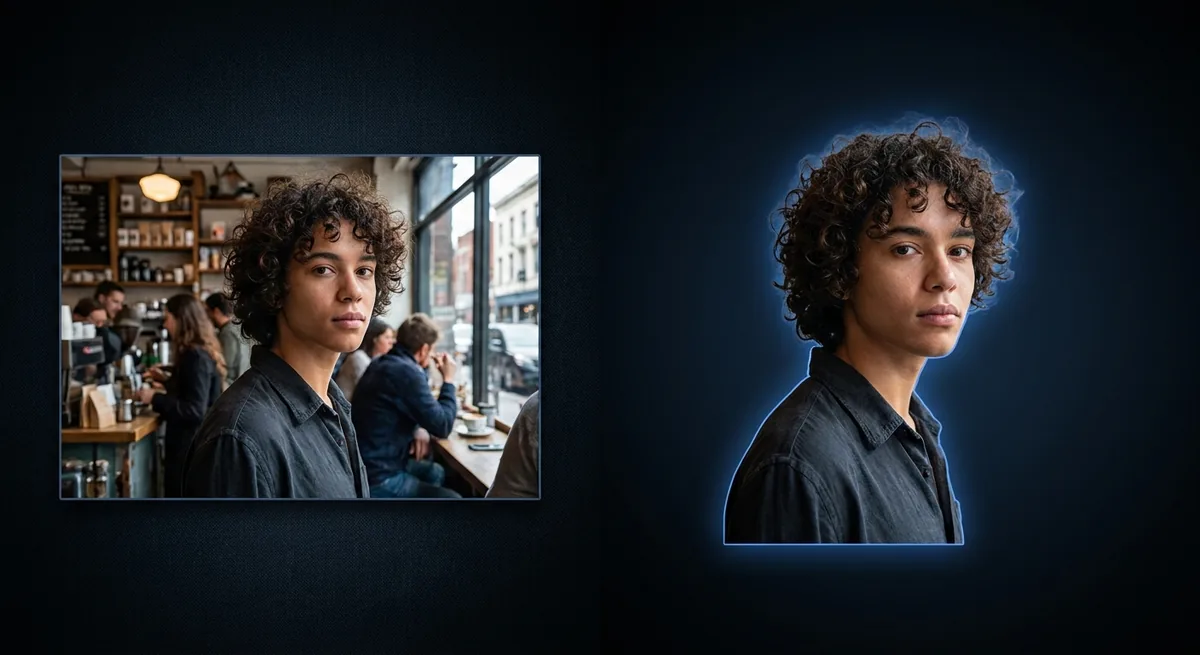
Background Remover - Upload & Remove Background
Click to upload or drag & drop
JPEG, PNG or WebP — max 10 MB
This tool is for creative and entertainment use only. Misuse to create deceptive or harmful content is strictly prohibited. Read our Content Policy.
How Background Remover Works
Upload your image
Add a photo with a clear subject you want to cut out.
AI removes the background
The subject is detected and isolated on a clean background in seconds.
Download the cutout
Save a clean cutout ready for designs, profiles or product shots.
Pixel-Perfect Edges, Automatically
Cutting out a subject by hand means painstaking work around hair, fur and fine edges. Our AI background remover does it in seconds: it detects the main subject, separates it from the background and produces a clean edge - Even around tricky details. You get a transparent PNG ready to drop onto any new background, color or design, with none of the manual masking.

Product Shots, Profiles & Design
Online sellers use it to put products on a clean white background for marketplaces, designers drop cut-out subjects into posters and thumbnails, and anyone can create a tidy profile picture in moments. It is also the first step for compositing - Remove the background, then place your subject into a brand-new scene. Need the subject itself to look sharper first? Run the Image Enhancer.
Best Photos for Clean Cutouts
Cutouts come out cleanest when the subject stands out from the background - Good lighting and a bit of contrast between subject and backdrop go a long way. Avoid busy backgrounds that blend into clothing or hair, and steer clear of heavy motion blur. A crisp, well-exposed photo gives the AI clear edges to follow and produces a more convincing result.


Your images stay yours
Free to use with no signup. Uploads are processed securely and removed automatically. Only use photos you own or have permission to edit.
Learn about safety →Best photos to use
- Single-subject shots where one person, product, or pet sits clearly in front of the backdrop, since the model has to pick exactly one main subject to keep.
- Product packshots with hard, defined outlines like bottles, shoes, mugs, or boxed goods, where the edge between item and surface is easy to trace.
- Photos with a clear tonal gap between subject and background, for example a person in a dark jacket against a pale wall rather than a black coat against a black sofa.
- Frames where the subject is in focus and the background detail is simple, because a busy or cluttered backdrop gives the cut line more places to wander.
- Sharp, glare-free uploads in JPEG, PNG, or WebP under 10 MB, since the model only has the detail the original actually captured to follow.
What to keep in mind
- Flyaway hair, fur, and see-through material like veils, glass, or chain-link can pick up a stray fringe of old-background pixels or get clipped where the original edge was ambiguous.
- When subject and backdrop share a tone, such as a gray shirt against a gray wall, the cut line drifts and parts of the subject may vanish or patches of background may survive.
- It returns one subject on white, not a true transparent cutout, so anyone who needs the subject on a colored scene, a gradient, or a layered composite has to knock out the white fill themselves afterward.
- With several candidate subjects in frame it keeps whichever it reads as primary, so a second person or a held object off to the side may be dropped along with the background.
What you get
A single downloadable image at the upload's resolution, with the original background removed and the detected subject placed on a flat solid white fill. The white is baked into the pixels: this is not a layered PSD and not a transparent PNG, so the subject cannot be dropped straight onto another color without first masking out the white.
Real ways to use Background Remover
Reach for the Background Remover when the whole backdrop is the problem and you want the subject on plain white. If the subject itself looks soft or dull, run the Image Enhancer first so the cutout edge is sharp. To wipe one intruding object while keeping the rest of the scene intact, use the Object Remover instead of stripping everything. If you only need a head-and-shoulders portrait sized for a document, the ID Photo Maker already delivers a white-background result framed to spec.